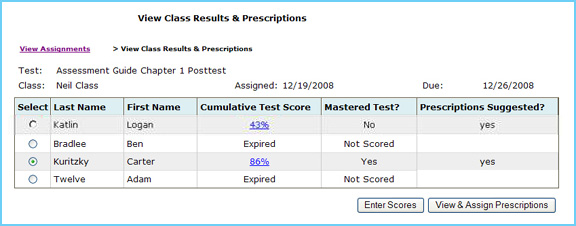
You can see test scores at a glance and the system will tell you whether the student has suggested prescriptive activities upon the mastery threshold you set when creating the test.
- The Cumulative Test Score column displays the student’s test score as a percentage for the entire assessment.
- To open and view a specific student test, click the link (the test score) in the Cumulative Test Score column.
Note:
This will open the test for review in a new window.
- The Mastered Test column displays whether or not the student achieved mastery against the test as a whole.
- The Prescriptions Suggested column tells you whether or not any prescriptions were recommended for the specific student based on the test results.
- A student can master a test as a whole, but still receive a suggested prescription if the student incorrectly answered questions associated with selected standards and did not meet the mastery threshold for each individual standard.
Note: This column will remain blank for any expired tests or tests that are not associated with a standard set.
- Select one student by using the appropriate radio button in order to enter in a score or display prescriptions.
- To score a test, click the Enter Scores button.
Note: Multiple choice tests are scored automatically. However, you will need to manually enter scores for short answer and essay questions.
- To view the suggested prescriptions for the selected student, click the View & Assign Prescriptions button.
Back to Top
|


